Capture enrol API
Capture enrol enables a one time Genuine Presence Assurance® (GPA) or Liveness Assurance™ (LA) user registration when trusted photo ID documents are not available or when the use case requires a liveness and user image capture only. There are no pre-enrollment requirements.
Implementation sequence
Capture enrol requires the following integration sequence:
- Generate an enrol token.
- Launch the client SDK with this token.
- Validate the token after the user journey has been completed.
If future verifications are required, such as recurring logins, use this enrollment to perform "right person" checks, see Verify enrolled users.
- The generated
user_idmust be stored for validation, audit trail, and future verification. - iProov recommends storing tokens with user records to help investigate and troubleshoot problems.
Implement the API calls
Use this sequence of API calls to capture enrol users:
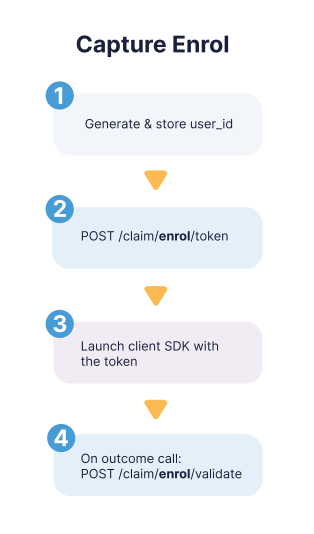
- Generate and store a
user_idthat conforms to the regex:[a-zA-Z0-9'\\+_@\\.-]{1,256} - Generate an enrol token:
POST /claim/enrol/token - Launch the client SDK using the token from the previous step.
- The user is guided through the journey using GPA or LA.
- Validate the token:
POST /claim/enrol/validate- You will receive one of these GPA or LA outcomes and the failure reason where appropriate:
true,false - This step also activates the user profile for future verifications.
- You must store the outcome with your user record. You cannot make subsequent calls to this endpoint with this
user_idandtokencombination.
- You will receive one of these GPA or LA outcomes and the failure reason where appropriate: